README
ELMO-8
A Simple Game Library Inspired by the Excellent PICO-8
The goal of the library is to offer a small, simple game development environment which aspires to be as charming as PICO-8.
There are deliberate limitations to keep things simpler and to encourage the 8-bit aesthetic.
Aspirational specs:
- Display: 128x128 16 colours
- Sprites: 128 8x8 sprites
- Map: 128x32 cels
- Controls: 2 6-button joysticks
Goals
- Be a nice little playground
- Be a simple teaching tool
- Be a nice way to write small games
Using
Install from http://package.elm-lang.org/packages/micktwomey/elmo-8/latest
elm package install micktwomey/elmo-8- Edit Hello.elm
- Download examples/birdwatching.png
elm reactor- Go to http://localhost:8000/Hello.elm

Hello.elm: ```elm import Elmo8.Console as Console import Elmo8.Pico8 as Pico8
type alias Model = {}
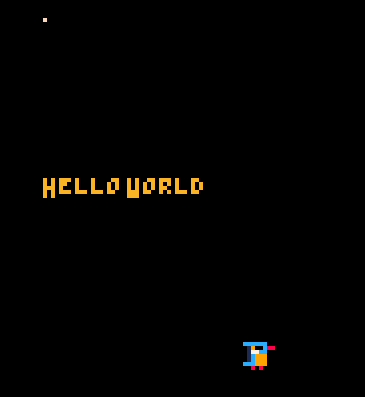
draw : Model -> List Console.Command draw model = [ Console.putPixel 10 10 Pico8.peach , Console.print “Hello World” 10 50 Pico8.orange , Console.sprite 0 60 90 ]
update : Model -> Model update model = model
main : Program Never main = Console.boot { draw = draw , init = {} , update = update , spritesUri = “birdwatching.png” } ```
The result should look like this:
Examples
To play with the examples in this repo:
git cloneelm package install(not required but useful to check dependencies)elm reactor- Look in http://localhost:8000/examples/
Posts
- http://www.twoistoomany.com/blog/2016/10/19/working-on-elmo-8
- http://www.twoistoomany.com/blog/2016/10/20/elmo-8-now-with-fonts